
Learn faster. Teach more simply.
PDFs, revisions and classes — AI helps at every step.


Free to start · No credit card required
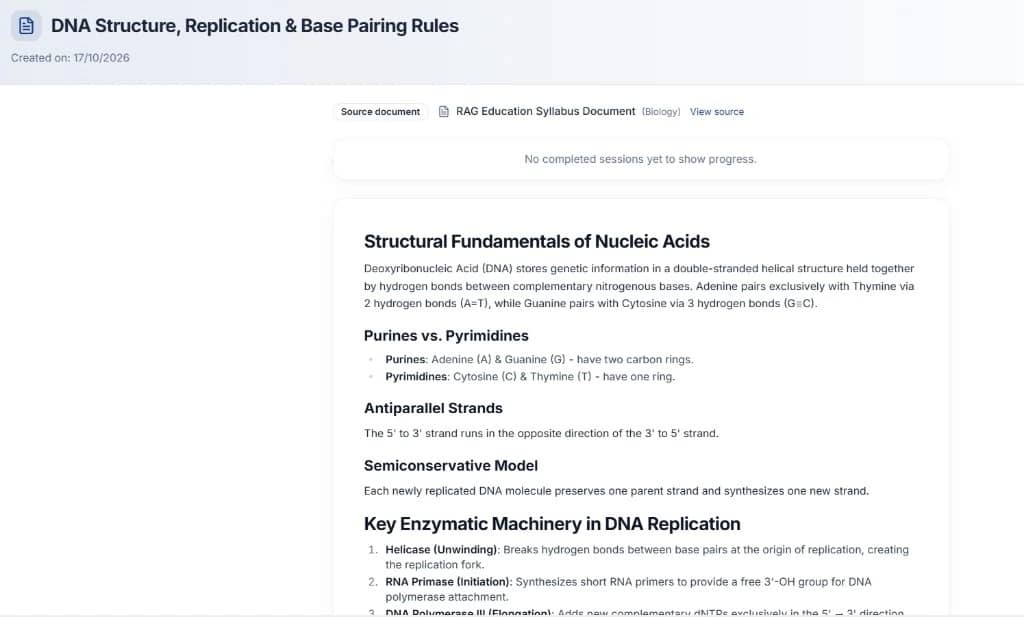
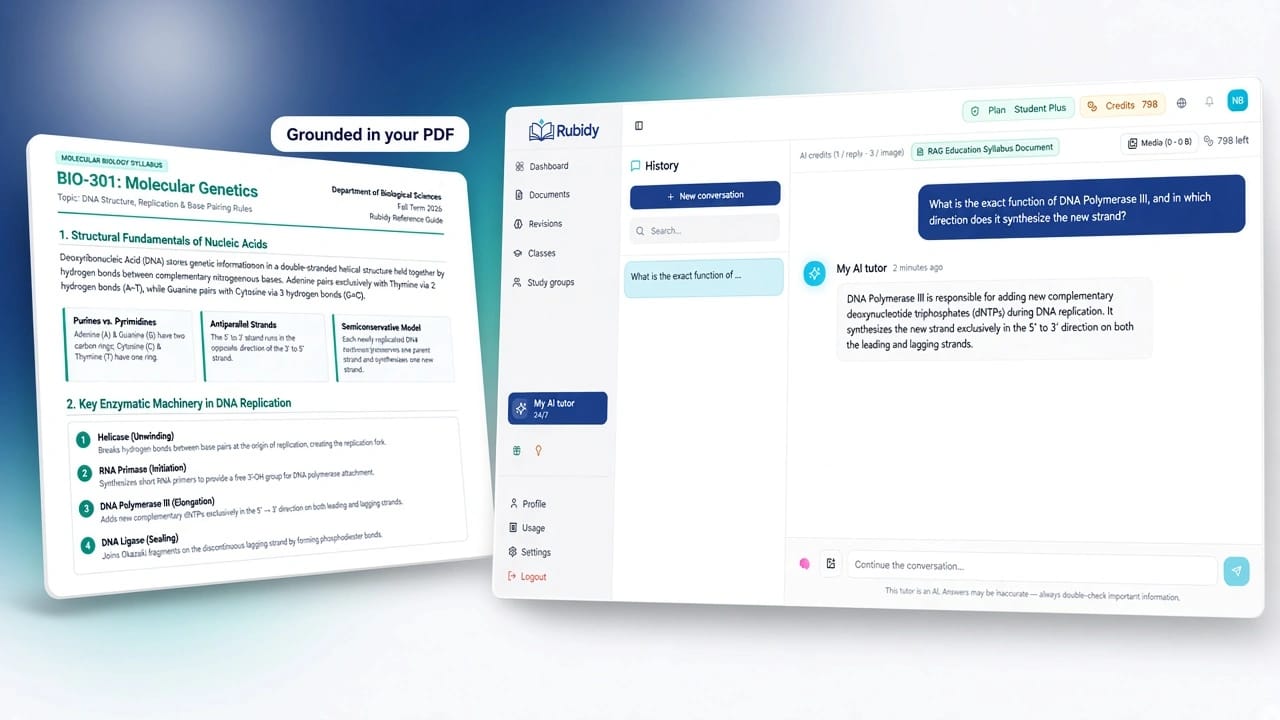
Grounded in your sources
Answers from the PDF
INTEGRATED WORKSPACE
5 in 1
The complete ecosystem. Without the clutter.
Stop juggling Drive, AI chat, and scattered gradebooks. Rubidy brings together your PDF library, Revisions tab, classes, groups, and tutor / assistant — each in its place.
Less time wasted, more focus, greater efficiency.
PDF library
Upload, index, and reuse your course documents.
Revisions tab
Summaries, sheets, flashcards, and quizzes from one PDF.
Classes & groups
Course content, assignments, and gradebook for teachers — clear progress tracking for learners.
Class quizzes & assignments
Created directly from class content with auto-graded MCQs.
Tutor & Assistant
Pedagogical chat grounded in your sources — or general AI assistance without PDFs.
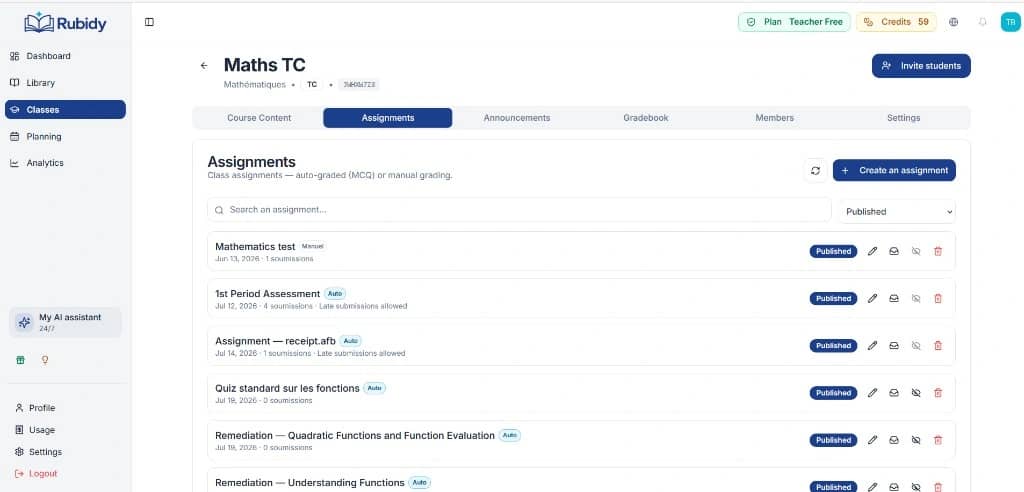
PDF submissions
Uploaded & auto-graded
Less time spent switching tools
Single workspace to upload, revise, assess, and collaborate
Clutter: every tool has its dedicated, intuitive space.
Who is Rubidy for?
One solution, two tailored experiences.
Revise smarter — go beyond simple AI chat.
Upload PDFs, generate study assets, ask the tutor when you’re stuck, and track your class progress.
Revisions from your PDFs
Summaries, sheets, flashcards, and quizzes created in the Revisions tab.
On-demand tutor
Grounded in your course documents, or generalist when no document is selected.
Classes & groups
Assignments, remediations, grades, and peer study groups.
Run your class: content, assignments, gradebook.
Organize modules, generate quizzes and assignments from class content, auto-grade MCQs, and export reports.
Content & assignments
Modules, quizzes, and assignments generated directly from class PDFs.
Gradebook & gaps
Score matrix, detailed question stats, gap analysis, and targeted remediation quizzes.
Exports & planning
PDF/CSV report exports, lesson planning, and an AI assistant to brainstorm.
Everything you need to succeed
A complete platform where every tool has a clearly defined role.
1. Documents, revisions & AI chat
Smart library
Drop your PDFs (scans included via OCR). Once indexed, they power the tutor, the Revisions tab, and class assignment and quiz generation.
Revisions tab
Create summaries, study sheets, flashcards, quizzes, or mixed packs from one indexed PDF. Generation happens here — not in the tutor chat.
Tutor & Assistant
The tutor guides, explains, and helps with homework using your selected sources; otherwise it acts as a generalist tutor. The teacher assistant helps prepare (e.g. lesson sequence) without replacing Content / Assignments.
2. Classes & collaboration
Structured classes
Teacher side: Content (modules), Assignments, Announcements, Gradebook, Members, Settings. Learner side: resources, homework, remediations, and grades.
PDF assignments, submissions & grading
Upload the assignment PDF (handout / prompt), collect learner submissions (file or text), then grade and score from the class. Quizzes can also be auto-graded.
Study groups
Peer spaces: chat, shared documents, and shared revisions to progress together.
3. Tracking, grading & exports
Gradebook & progress
Learner: dashboard and class grades. Teacher: gradebook (matrix / student / activity), auto-graded quizzes, gap analysis, and remediation.
Clear exports
Learner: revision PDF and Anki (flashcards). Teacher: gradebook PDF, activity report (+ gaps), student sheet, submission CSV/PDF, analytics CSV.
Bilingual experience
UI and content in French and English.
Why choose Rubidy?
A complete learning platform — far more than a chatbot.
Your documents at the heart of learning
When your PDFs are selected, the AI relies exclusively on your courses. Your sheets, quizzes, and assignments are generated directly from your indexed documents.
Explore the PDF librarySmooth teacher–student collaboration
Teachers publish content and assignments; learners submit work, check grades, and revise at their own pace. The AI tutor supports every step without replacing the teacher.
See the Class workspaceOne all-in-one workspace
PDF library, revisions, class management, gradebook, and AI tutor in a single interface — no more juggling ten tools.
Account setup in 1 minute • No credit card required
Detailed features
Each real product path, clearly separated
Documents → Revisions → Tutor → Classes. Four distinct roles.
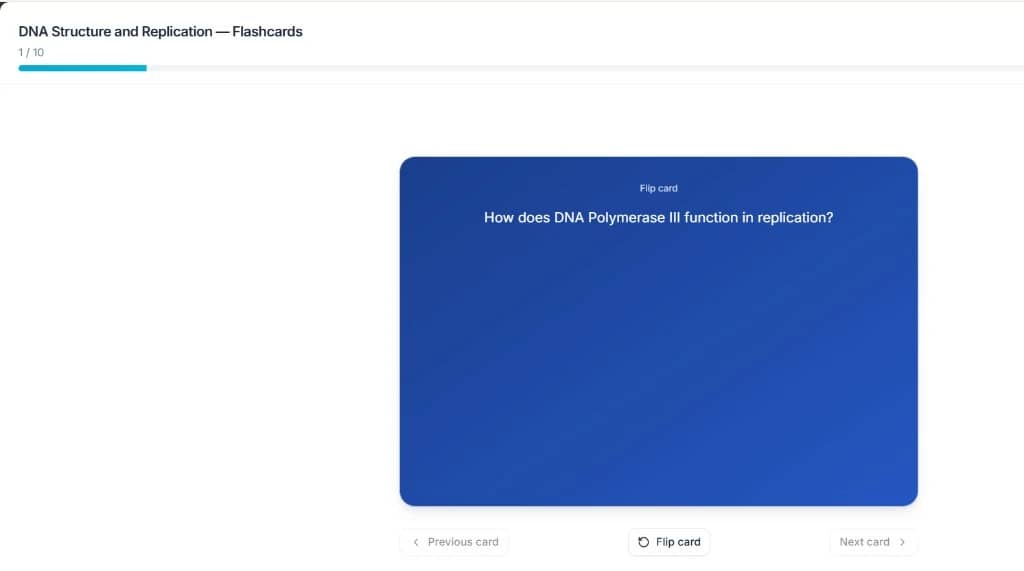
Export ready
PDF & Anki
Document library
Upload PDFs, organize them into folders, and enable AI indexing. An indexed document can then power a revision or ground a tutor conversation.
Revisions tab
This is where you create summaries, sheets, flashcards, quizzes, or mixed packs from one indexed PDF. Practice, export to PDF or Anki (flashcards). All your sheets and flashcards live here — separate from the tutor chat.
See the Revisions journeyAI Tutor
Personalized support to understand your courses and answer your questions. With selected PDFs: grounded answers (RAG). Without sources: generalist tutor. Photo help available.
Understand the tutor’s roleClasses
Join with a code: Content (modules & PDFs), Assignments, Remediations, Announcements, Grades, and Members. Submit work (auto-graded quizzes or manual upload) and track scores.
Study groups
Peer spaces: discussion, shared documents, and shared revisions — independent from teacher classes.
Documents → Revisions → Tutor → Classes, in 4 steps
How it works?
Four clear steps — every tool in its place.
Import your documents
Upload your PDFs and enable AI indexing so you can use them next.
Generate in Revisions
From the Revisions tab: summary, sheet, flashcards, or quiz from one indexed PDF.
Ask the tutor if needed
The tutor guides and helps (homework, concepts) with selected sources — or in generalist mode.
Class & groups
Join a class, submit work, track grades; or revise with peers in a study group.
Sign up in 30 seconds • No credit card
Plans tailored to each role
Learner or teacher — pay only for what you use.
Upgrade is immediate. Downgrade and cancellation keep your purchased credits.
Free
Discover the assistant and start revising.
- Joined classes: Unlimited
- 1 study group
- 50 MB secure storage
- 25 AI credits / month
- 1 document max per conversation (tutor RAG)
- Revision sheet export
Plus
Ideal for a productive, uninterrupted revision semester.
- Joined classes: Unlimited
- 3 study groups
- 2 GB secure storage
- 250 AI credits / month
- Up to 3 documents per conversation (tutor RAG)
- Revision sheet export
- Email support
Pro
The complete solution to excel in your exams.
- Joined classes: Unlimited
- Unlimited study groups
- 10 GB secure storage
- 750 AI credits / month
- Universal RAG (full library)
- Revision sheet export
- Priority support 24/7
Need more credits? Buy a pack any time — bonus credits never expire.
Frequently Asked Questions
Ready to transform how you learn or teach?
From your PDFs to real outcomes — without juggling extra tools.
Free plan included • No commitment
Still have a question? Contact support